Build an emergency communication ladder before the signal drops
An alert tells you that something is happening. A communication plan helps everyone act when the household is separated, power is out, mobile data is slow, or one person never saw the alert. Treat those as two related problems and give each more than one path.
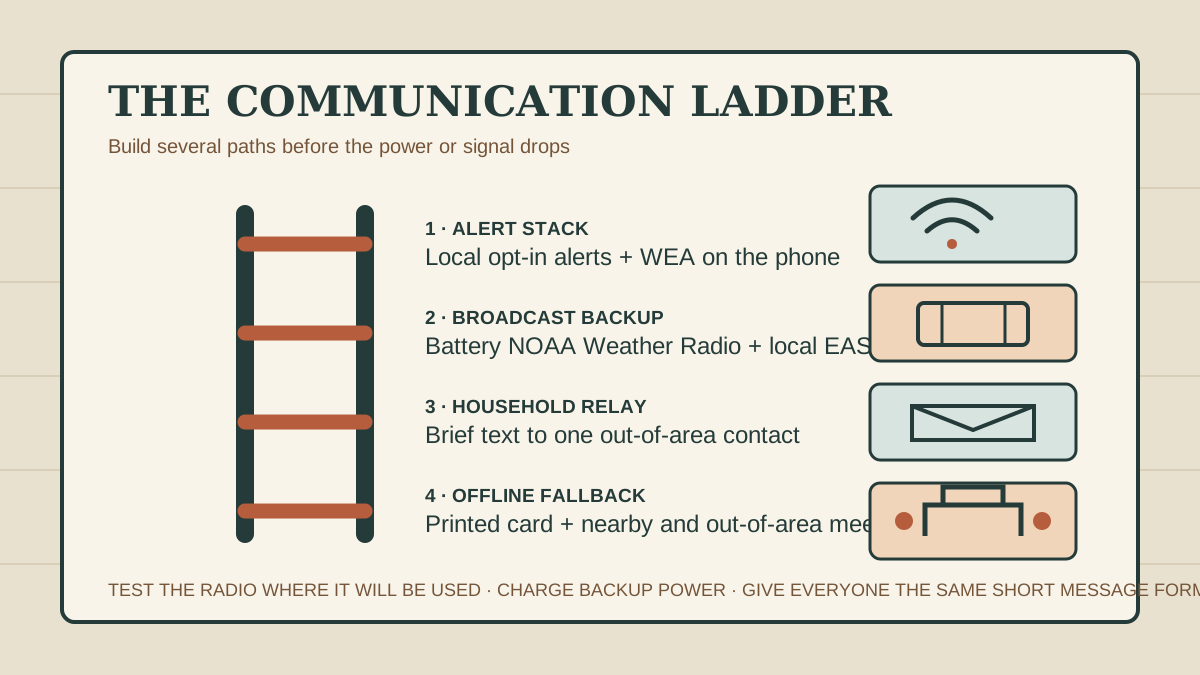
Separate the alert problem from the check-in problem
Emergency information can reach a household through Wireless Emergency Alerts, local emergency-management texts or emails, radio and television through the Emergency Alert System, NOAA Weather Radio, agency websites, sirens, and direct instructions from responders. None is a promise that every person will receive every message. A phone may be silenced, discharged, outside a targeted area, or disconnected from service. A weather-radio signal may be weak behind terrain or inside a particular building. Internet service and commercial power may fail on different schedules.
That is why the first half of the plan is an alert stack: several official ways to learn what is happening. The second half is a household ladder: a fixed order for checking in, relaying status, and reuniting when normal communication is unreliable. Buying one radio without programming or testing it does not complete either half. Adding six apps that all depend on the same phone and data connection does not create much redundancy.
Write the hazards that matter where you live: severe weather, wildfire, flood, chemical release, winter outage, earthquake, or another local risk. Then ask the local emergency-management office which opt-in service it uses and where it posts official updates. Use the same sources when reviewing the first 30 minutes of a wildfire warning. The aim is not to monitor every rumor. It is to recognize one credible instruction quickly and move.
Build an alert stack with different failure points
1. Enroll in local opt-in alerts
Many counties and cities operate a text, phone, or email alert system for local hazards. Enrollment is often separate from Wireless Emergency Alerts. Use the official local-government page rather than a link forwarded in social media. Enter the addresses and locations the system permits, including a workplace, school, or a relative’s home when the service is designed for them. Select accessible delivery formats and languages that the service offers. Review the account after moving or changing phone numbers.
2. Check Wireless Emergency Alert settings
Wireless Emergency Alerts, or WEA, can send geographically targeted warnings to compatible phones through participating wireless providers. They do not require a downloaded app. Phone menus differ, and alert categories or language features vary by device and provider, so inspect each household phone rather than assuming they match. Install supported operating-system updates, confirm the alert settings you intend to receive, and leave location services configured according to the phone maker’s and official alert guidance when precise targeting is supported.
WEA is a strong path because it is designed for urgent public warnings, but it is still one rung. A person may be outside the warning area, the device may be off, or network conditions may be impaired. Never interpret the absence of a phone alert as proof that conditions are safe when smoke, rising water, official radio, or responders indicate otherwise.
3. Test a battery broadcast path
NOAA Weather Radio broadcasts weather warnings, watches, forecasts, and some non-weather emergency information around the clock. An alerting receiver can sound a warning tone; models with Specific Area Message Encoding can be programmed for selected areas. Some public-alert receivers offer displays or connections for lights, bed shakers, and other accessibility devices. Follow the receiver manual and the local National Weather Service transmitter information exactly.
Test reception in the room where the radio will be used, with the antenna and power arrangement you expect during an outage. National Weather Service offices note that terrain, distance, buildings, and other factors can create reception gaps even within an expected coverage area. Store the correct spare batteries, label the controls, and schedule a monthly test. Also write down one local radio station that carries Emergency Alert System information and confirm that the radio receives it indoors.
4. Keep an official web path, without making it the only path
Bookmark the local emergency-management office, utility outage map, National Weather Service forecast office, road authority, and any evacuation-zone lookup used locally. A state or FEMA app may add useful information. These tools can provide detail that a short alert cannot, but they depend on power, devices, service, and current links. Capture the essential phone numbers, zones, frequencies, and meeting locations on paper.
Write the household communication ladder
Choose one adult outside the likely affected area as the household relay. Long-distance messages may sometimes work when local systems are congested, and an out-of-area contact gives separated people one place to leave status. Ask first, explain the role, and give the contact the household’s two meeting places. The relay should know that their job is to record short updates, not direct people through conditions they cannot see.
Then choose two reunion points. The nearby point is a safe, familiar place within walking distance for a small incident such as a building evacuation. The farther point is outside the neighborhood or evacuation zone for an event that makes the nearby point unusable. Check access, opening hours, weather exposure, transport, mobility, pet rules, and whether children or caregivers may go there. A school, fire station, or store is not automatically available simply because it is easy to name.
Give everyone the same order:
- Follow the immediate official protective action.
- When safe, send one brief text to the out-of-area relay and the household group.
- If a reply does not arrive, wait the planned interval instead of repeatedly calling.
- Monitor the alert stack and go to the named meeting place only when the route and official directions allow it.
- If all electronic paths fail, use the printed card and the prearranged time-and-place rule.
Do not make the ladder depend on one person remembering every number. Children should know which trusted adult they may go with and who is authorized to collect them. Caregivers, neighbors, and separated family members need only the information relevant to their role. Review school, workplace, assisted-living, and transit reunification rules so the household plan does not conflict with them.
Use one short status message
Ready.gov recommends texting rather than talking when networks are strained, unless someone is in danger, because brief texts may get through and leave voice capacity available. Write a format that is fast to scan:
SAFE — North library — staying inside — text again at 4:30
LEAVING — home — taking Route B to Aunt Lee — ETA 35 minutes
Use plain locations and times. Avoid long explanations, photos, or group speculation. If help is needed, say what kind and use emergency services for immediate danger. Do not post a child’s location, an empty home, medical details, or travel route publicly. The relay can answer each person with the latest verified household status rather than starting a crowded call.
Keep a small decision log: source, time, exact instruction, action taken, and next review time. This is especially useful when an outage, evacuation warning, and water problem overlap. Record what an official source actually said before passing it on. A screenshot can preserve an alert, but confirm later changes through the official channel. Label unconfirmed information as unconfirmed and do not forward it merely because it sounds urgent.
Plan for a dead battery and weak cellular service
Charge phones and tested power banks before forecast hazards. Store the correct cables together and check whether a vehicle charger works without leaving an engine running in an enclosed space. During an outage, dim the screen, close unnecessary apps, shorten calls, and use low-power mode when it does not interfere with required alert functions. Check messages on a schedule instead of refreshing continuously. A phone kept warm and dry may perform better in cold conditions, but keep batteries away from unsafe heat.
Airplane mode can save power when service is absent, but it can also stop calls, texts, data, and some alert delivery. Use it only as part of a deliberate check-in schedule and understand the device. Likewise, turning location or wireless features off may affect alerts or targeting. The goal is not maximum battery life at the cost of receiving the instruction you need.
If cellular service fails, move down the ladder: listen to the tested radio, follow responder or posted instructions, use the trusted nearby support network, and apply the meeting-place rule. Do not drive toward a tower, hill, fire station, hospital, or incident scene solely to find a signal. Roads and public-safety facilities may need to remain clear. If the household is sheltering safely, conserve energy and wait for the next planned information check.
Power, water, and communications can fail in different combinations. Keep the communication card beside the power-and-water outage sequence. In cold weather, put it at the exit station in the one-warm-room plan. This makes every briefing point toward the same contacts and destinations.
Build around accessibility, language, medicine, and care
Redundancy should include different senses and different people. A loud radio alert may not reach someone who is deaf or hard of hearing; a visual alert may not wake someone or work for a person with low vision. Look for officially recognized public-alert receiver features that match the user, such as displays and external alert-device connections, and test the complete setup. Keep hearing-aid, communication-device, and mobility-device charging in the power plan.
Choose alerts in the languages household members can act on quickly. Translate the short status format and the card before an emergency. A bilingual neighbor can be part of a support network, but should not be the household’s only source of official warnings. Use agency translations and language-access services when available.
People who use powered medical equipment or temperature-controlled medicine need an earlier decision point. Add the equipment provider, utility medical-support program if applicable, clinician, pharmacy, and accessible transport to the card. The refrigerated-medicine decision log should name the same relay and destination. Do not put diagnoses or sensitive details on a card that will be carried publicly; include only what is necessary for safe support.
Plan who contacts a person who may not recognize alerts, use a phone, read a message, or leave independently. Give that helper a backup. Include service animals and household pets in the destination and transport plan. A plan that assumes every person hears, reads, remembers, walks, drives, and charges a device in the same way is not finished.
Put the essential plan on one offline card
- Local emergency-management alert enrollment page and public information number.
- Primary NOAA Weather Radio frequency or transmitter and one local EAS radio station.
- Household members’ numbers and the out-of-area relay.
- Nearby meeting place, farther meeting place, and one alternate route to each.
- School, workplace, care facility, building manager, utility, and transport contacts.
- Accessibility support, essential equipment, pet transport, and medication contacts.
- The short status format and the time to try again if a message does not send.
Print copies for wallets, bags, the home information station, and trusted caregivers. Use a protective sleeve. Date the card and review it every six months, after a move, and whenever a phone, school, caregiver, or destination changes. Keep a copy with the go bag, but do not include passwords, financial details, account security answers, or unnecessary medical information.
Run a 15-minute communication drill
- Send a clearly labeled test message using the household format.
- Ask the out-of-area relay to repeat each person’s status and next check time.
- Open the local alert enrollment page and verify the registered numbers and addresses.
- Find the WEA settings on each compatible phone without changing categories accidentally.
- Unplug the radio, install its backup batteries, tune the local source, and confirm usable reception where it will sit.
- Have each person point to both meeting places and name the condition for using each.
- Simulate one failure: no mobile data, one dead phone, an inaccessible route, or the relay not answering.
- Use the printed card to complete the plan, then fix the first weak point you found.
The drill is successful when it exposes a failure while everyone is safe. Maybe the radio is inaudible in a bedroom, the cable does not fit a new phone, the child names an old meeting place, or a caregiver lacks the relay number. Correct that one problem and schedule the next brief test. Familiar steps reduce the urge to improvise when messages are delayed.
Questions households ask
Will emergency alerts work when my house has no power?
Some may. A charged phone can receive WEA or local alerts while the wireless network remains available, and a radio can run on batteries. Infrastructure has different backup limits, so keep multiple paths and conserve device power.
Do Wireless Emergency Alerts need an app?
No separate app is required for WEA on a compatible device and participating network. Check the phone’s settings and software because menus, alert categories, languages, and capabilities vary.
What if the weather radio does not receive clearly in my home?
Try permitted antenna positions and locations according to the manual, identify the appropriate local transmitter, and test again. Terrain and structures can cause gaps. Keep another official broadcast or alert path; do not assume a receiver will work everywhere simply because the address appears near a coverage area.
Should everyone call the same person?
Yes, an out-of-area relay is useful, but brief texts are usually the starting method when networks are strained and nobody is in immediate danger. The relay should record status and next-check times. Emergency calls still go to emergency services.